

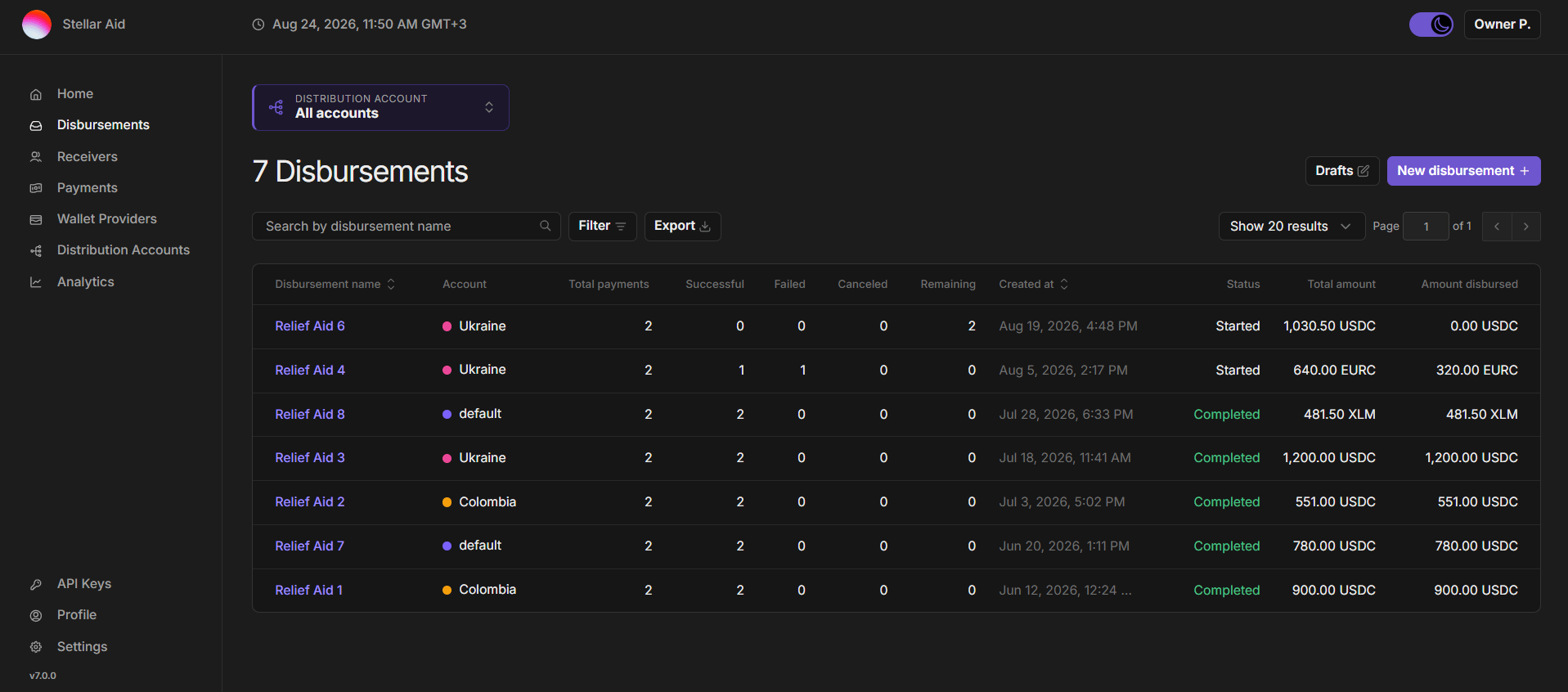
- Drafts: Click the Drafts button at the top right to go to a list of disbursements that have been created but not yet submitted.
- New disbursement: Click the New Disbursement button to start the process of creating a new disbursement.
- The Drafts and New disbursement buttons only appear for roles permitted to create or approve disbursements.
- Search by disbursement name: Input the name of a disbursement to quickly find specific details.
- Filter: Allows you to narrow down the disbursement list based on specific criteria like status or creation date.
- Export: Download the disbursement list as a CSV. The export applies your current search, filters and selected distribution account, so it matches what you see on screen.
- Disbursement detail: Each disbursement is displayed with the following details:
- Disbursement name: The unique name assigned to the disbursement by your organization.
- Account: The distribution account the disbursement was made from. Shown only when ‘All accounts’ is selected and your organization has more than one account.
- Total payments: The total number of payments within the disbursement.
- Successful: The number of payments within the disbursement that have been processed successfully from the distribution account to registered wallets.
- Failed: The number of payments that failed during processing.
- Canceled: The number of payments that were canceled before being sent.
- Remaining: The number of payments that are yet to be processed.
- Created at: The date and time when the disbursement was created.
- Status: The current status of the disbursement.
- Total amount: The total value of the disbursement in the appropriate asset.
- Amount disbursed: The amount of the disbursement that has already been paid out.
- You can click into an individual disbursement to see its details, including a full list of receivers and payments.