

Adding a Wallet to an SDP
The default list of SDP wallets depends on which network is being used (testnet or pubnet). The network is passed as an environment variable and then the list of wallets can be seeded appropriately on SDP startup through the CLI command./stellar-disbursement-platform db setup-for-network, according with a hardcoded list of known wallets. Alternatively, wallets can be inserted directly into the SDP database through a SQL command. Both methods require adding the wallet name, homepage, SEP-10 client domain, and deep link schema.
To insert it directly into the database, update your values and run the following Postgres query. Make sure to check your database and namespace first.
DefaultWalletsNetworkMap. This will be used when you execute the ./stellar-disbursement-platform db setup-for-network CLI command, which updates the SDP database and makes the wallet available for new disbursements. Add your new wallet following the same format already present in the code.
Recipient Registration Experience
The recipient registration experience is paramount to make this application smooth and easy to use. this requires the wallet to support deferred deep linking, which will be discussed in a later section. A good description of the registration experience is as follows:- The recipient receives an invitation message notifying them they have a payment waiting from the organization and prompts them to click a deep link to open or install&open a wallet application
- When the recipient opens the wallet app, the wallet immediately onboards the recipient, creates a Stellar account and trustline for the desired asset, initiates a SEP-24 deposit transaction with the SDP, and opens the SDP’s registration webpage as an overlay screen/iframe inside the app.
-
The user confirms their phone number and date of birth directly with the SDP, without sharing any data with the wallet, and after the registration finishes, the user is sent back to the wallet application. Here are the screens demonstrating these steps:
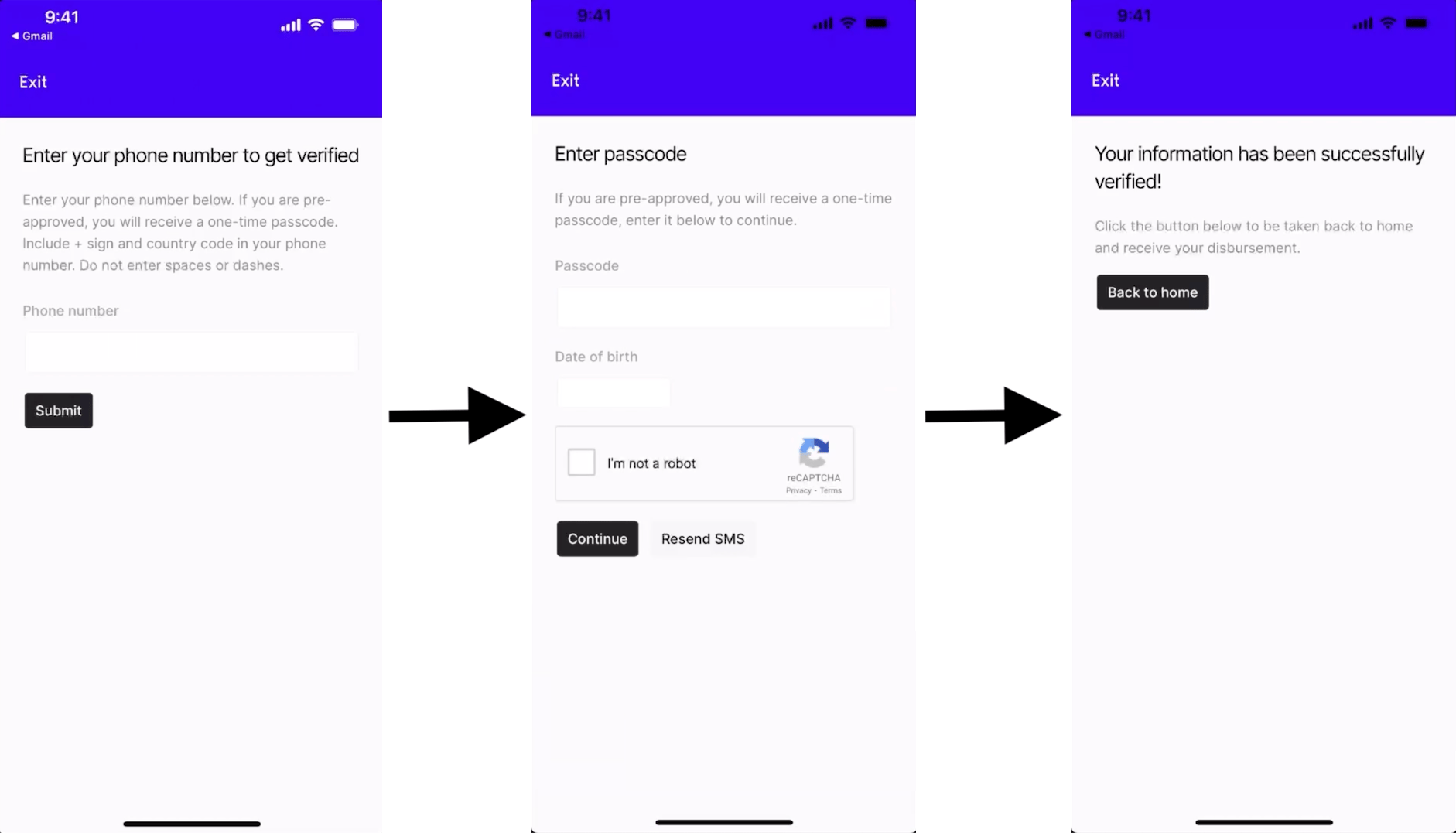
- The user receives the payment within seconds
Registration Deep Link
Once the user has installed the wallet application, the wallet should be able to interpret a deep link that follows the format registered in the SDP in order to kick off the Wallet Registration Procedure. The deep link format supported by the SDP follows this format:asset: the Stellar asset.domain: the domain hosting the SDP’sstellar.tomlfile. The wallet will need to use it to both fetch thestellar.tomlfile, and to populate thehome_domainfield in the SEP-10 GET challenge transaction.name: the name of the organization sending payments.signature: a signature from the SDP’s SEP-10 signing key.
Note that the deep link is specific to each SDP, payer org, and asset. It is not specific per individual receiver. There is no risk in sharing the link with receivers who are part of the same disbursement. The link will be the same for multiple receivers and they will prove their identity as part of the SEP-24 deposit flow.
https://vibrantapp.com/sdp-dev and the signature is the result of signing the below (unsigned) url using the SEP-10 signing key SBUSPEKAZKLZSWHRSJ2HWDZUK6I3IVDUWA7JJZSGBLZ2WZIUJI7FPNB5, with the public key being GBFDUUZ5ZYC6RAPOQLM7IYXLFHYTMCYXBGM7NIC4EE2MWOSGIYCOSN5F:
fea6c5e805a29b903835bea2f6c60069113effdf1c5cb448d4948573c65557b1d667bcd176c24a94ed9d54a1829317c74f39319076511512a3e697b4b746ae0a.
Below is a JavaScript snippet demonstrating how to verify the signature:
Wallet Registration Procedure
When opening registration deep link, these are the steps the wallet should follow in order to enforce the security and privacy measures expected in this flow, and to allow the user to input their information directly with the SDP:- 🚨 Confirm that the
domainof the deep link is on the wallet’s allowlist. This is crucial for authenticating from a trusted wallet.🚨 - Fetch the SDP’s toml file at
{domain}/.well-known/stellar.tomland confirm theSIGNING_KEYvariable is populated. - Verify that the registration link signature was made using
SIGNING_KEYsimilar to thekeypairPk.verify(...)function in the snippet above, and that the signature is valid with the content of the link. - Check the
assetfrom the link and confirm that the recipient user has a trustline for that asset. Create one if it doesn’t exist. - (Optional) Use the
namefrom the link to update the wallet user interface. - Initiate the SEP-24 deposit flow with that asset using the
TRANSFER_SERVER_SEP0024value from the SDP’s toml file.- This includes using SEP-10 to authenticate the user with the SDP server. Please notice that the SDP requires both the
client_domainandhome_domainfields to be provided in theGET <WEB_AUTH_ENDPOINT>request, and they should be set as follows:client_domain: the domain of the wallet server that exposes the wallet server’sstellar.tomlfile.
home_domain: the domain of the SDP’s server that was present in the registration link.account: the Stellar account of the receiver’s wallet.
- This includes using SEP-10 to authenticate the user with the SDP server. Please notice that the SDP requires both the
- Launch the deposit flow interactive in-app browser within your mobile app, following the instructions in the SEP-24 spec.
- ATTENTION: the wallet should not, in any circumstances, scrape or attempt to scrape the content from the in-app browser for the recipient’s information.
- NOTE: it’s highly recommended to use an in-app browser rather than a webview.
- 🎉 Congratulations! The recipient user can now fill out the forms in the in-app browser and register to receive their payment 🎉.
- This is how the wallet will know that the user is associated with a certain org or SDP.
- Saving the data is useful for reporting and troubleshooting, especially if the wallet needs to justify the source of funds for regulatory or tax purposes.
- If the payer org wants to pay any cashout fees charged by the wallet or offramp, the wallet will need to know which users and transactions should be invoiced upstream.
Deferred Deep Links
Most likely, the intended recipient will not have the necessary wallet application installed on their device. For this reason, wallets should support the concept of deferred deep linking, which enables the following flow:- The recipient’s initial action of clicking the deep link should redirect them to the appropriate app store to download the wallet application.
- After installing and opening the application, the recipient should be rerouted to the wallet’s typical onboarding flow.
- Once the user has successfully onboarded, the wallet should use the information included in the deep link to kick off the Wallet Registration Procedure.
https://<host-with-optional-path>. If your wallet’s deep linking system needs a more complex structure, you’ll have to manage this with a web application. This application should be owned by the wallet provider, and it should be able to receive the deep link, interpret it, and direct the user to the correct location.