

- Your business is processing the KYC information provided by the user
- Your business is ready to receive funds from the user
- Your business has received funds from the user
- Your business has sent funds to the user
- Your business has processed a refund for the user’s transaction
- Your business experienced an unexpected error
Callbacks
The Anchor Platform relies on the business server to provide and store information about quotes.Quotes and Fees
To support the exchange of non-equivalent assets, the Anchor Platform exposes a SEP-38 compliant API to provide quotes for the exchange. The quote API is used to provide the user with the expected amount of the asset they will receive in exchange for the asset they are sending. The quote API is also used to provide the user with the expected fees for the transaction. Therefore, your business server must implement the rate API to provide quotes to the Anchor Platform.Securing Platform API
It’s recommended to keep Platform server accessible only from the private network. However, you may want to add additional layer of protection via securing the API.
Using API Key
To enable API key authentication, modify yourdev.env file:
X-Api-Key header, set to the configured API key.
Using JWT
To enable JWT authentication, modify yourdev.env file:
SECRET_PLATFORM_API_AUTH_SECRET is at least 32 characters long for security.
Once enabled, all requests must include a valid Authorization header with the format Bearer <JWT token>.
Making JSON-RPC Requests
Before making JSON-RPC requests, let’s first create a template for making a request to the Anchor Platform.JSON-RPC Request
The Request object must contain the following attributes:string
A String specifying the version of the JSON-RPC protocol. MUST be exactly “2.0”
string
A String containing the name of the method to be invoked. List of available methods you can see in JSON-RPC Methods
object
A Structured value that holds the parameter values, corresponding to method call, to be used during the invocation of the method
string
An identifier established by the client. The Server will reply with the same value in the Response object
JSON-RPC Response
The Response is expressed as a single JSON Object, with the following attributes:string
A String specifying the version of the JSON-RPC protocol. It’s set to “2.0”
object
A Structured value that holds the updated transaction details
string
An identifier sent by the client
object
A Structured value that holds the error details
Error Codes
Updating Deposit Transaction Via JSON-RPC
SEP-24 deposit flow diagram defines sequence/rules of the transaction’s status transition and a set of JSON-RPC methods that should be called to change that status. You can’t define the status you want to set for a specific transaction in your requests. Each JSON-RPC method defines data structures that it expects in request. If request doesn’t contain a required attributes, the Anchor Platform will return and error and won’t change status of the transaction.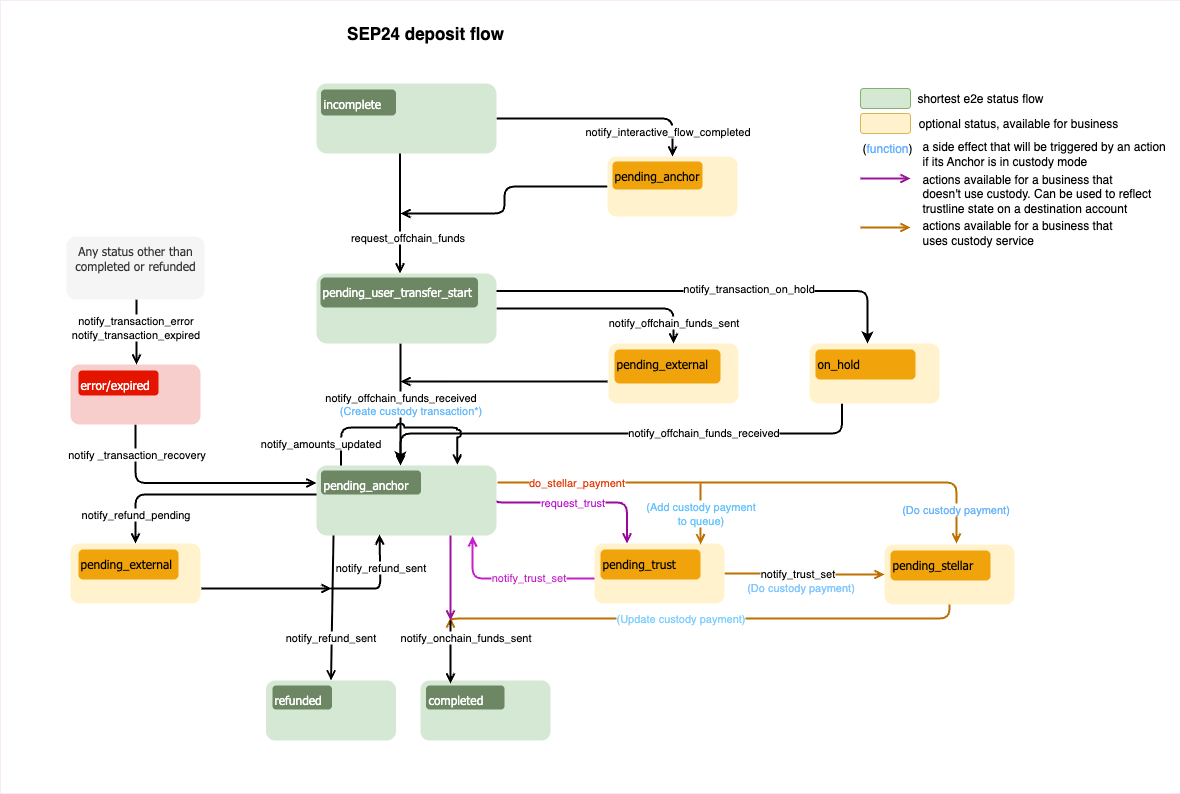
Ready to Receive Funds
The first step of the deposit flow after starting the deposit itself is collecting KYC. It’s usually done in the web-app, but can also be optionally provided by the wallet application, using SEP-9. Once the necessary KYC is collected, arequest_offchain_funds JSON-RPC request should be made.
amount_inis the amount the user has to sent to the business.amount_outis the amount the user will receive.fee_detailsis the total amount of fees collected by the business.assetis part of theamount_xfield and is in a SEP-38 format. In this example, it’s set to USD, assuming the user made a bank transfer to the system using USD.
incomplete to the pending_user_transfer_start status. If transaction status is changed from pending_anchor to pending_user_transfer_start, you can skip defining the amounts.
To execute this, you need to run:
Processing KYC Information
You must specify theamount_x fields.
Funds Received
If offchain funds were received, you’ll want to provide an updated transaction information.funds_received_atis the date and time of receiving fundsexternal_transaction_idis the ID of transaction on external network
Waiting For User Funds
In a real world, the transfer confirmation process may take time. In such cases, transactions should be set to a new status indicating that the confirmation of the transfer has been received but the funds themselves have not been received yet.Sending Onchain Funds
Next, send a transaction on the Stellar network to fulfill a user request. After the transaction completion, it’s necessary to send thenotify_onchain_funds_sent JSON-RPC request to notify a user that the funds were successfully sent.
stellar_transaction_idis the transaction id on Stellar network of the transfer
completed status.
Pending Trust
This status has to be set if a payment requires an asset trustline that wasn’t configured by the user. There are two ways of how the transaction may be moved to thepending_trust status. The first one is when the business server detects that the trustline isn’t configured. The second one is when the business itself detects that the trustline is missing and wants to notify the user that it has to be configured. To move the transaction to the pending_trust status, it’s necessary to make the following JSON-RPC request:
The business server periodically checks if the trustline was configured. If it was, it may send a payment and change the status of the transaction to
pending_stellar.Trust Set
This status has to be set if the business has detected that the trustline was or wasn’t configured by user.successflag which defines if trustline was or wasn’t configured by user
Depending on the
success flag, the status of the transaction will be changed to pending_stellar if the trustline was set, or to pending_anchor if it wasn’t.Sending Refund
There is a possibility to send funds back to the user (refund). You can refund the whole sum(full refund) or do a set of partial refunds. Also, if user sent more money than expected, you can refund a part of the sum back to the user and send the rest as onchain funds.If a sum of refunds is less than
amount_in, the status of the transaction will be set to pending_anchor. Only if the sum of refunds is equal to amount_in, the status of the transaction will be set to refunded.Refund Pending
It’s similar to Refund sent, but it handles a case when a refund has been submitted to external network but is not yet confirmed. The status of the transaction is set topending_external. This is the status that will be set when waiting for Bitcoin or other external crypto network to complete a transaction, or when waiting for a bank transfer.
Transaction Error
If you encounter an unrecoverable error when processing the transaction, it’s required to set the transaction status toerror. You can use the message field to describe the error details.
Expired Transaction
Your business may want to handle abandoned transactions by expiring those have remained inactive for a certain period. To achieve this, check the transaction status using theGET /transactions endpoint and sort the results by the user_action_required_by timestamp. If the timestamp has passed, manually execute the appropriate logic, such as expiring the transaction or initiating an auto-refund, based on the transaction’s current status. For example, to expire transaction business should change the transaction status to expired:
On-Hold Transaction
In rare cases, you may want to pause current transaction and request more information from the user (after the transfer has been received). This could be used for compliance use cases.Transaction Recovery
Transaction status can be changed fromerror/expired to pending_anchor. After recovery, you can refund the received assets or proceed with processing of the transaction. To recover a transaction, it’s necessary to make the following JSON-RPC request:
Updating Withdrawal Transaction Via JSON-RPC
This diagram defines a sequence/rules of transaction’s status transition for SEP-24 withdrawal flow.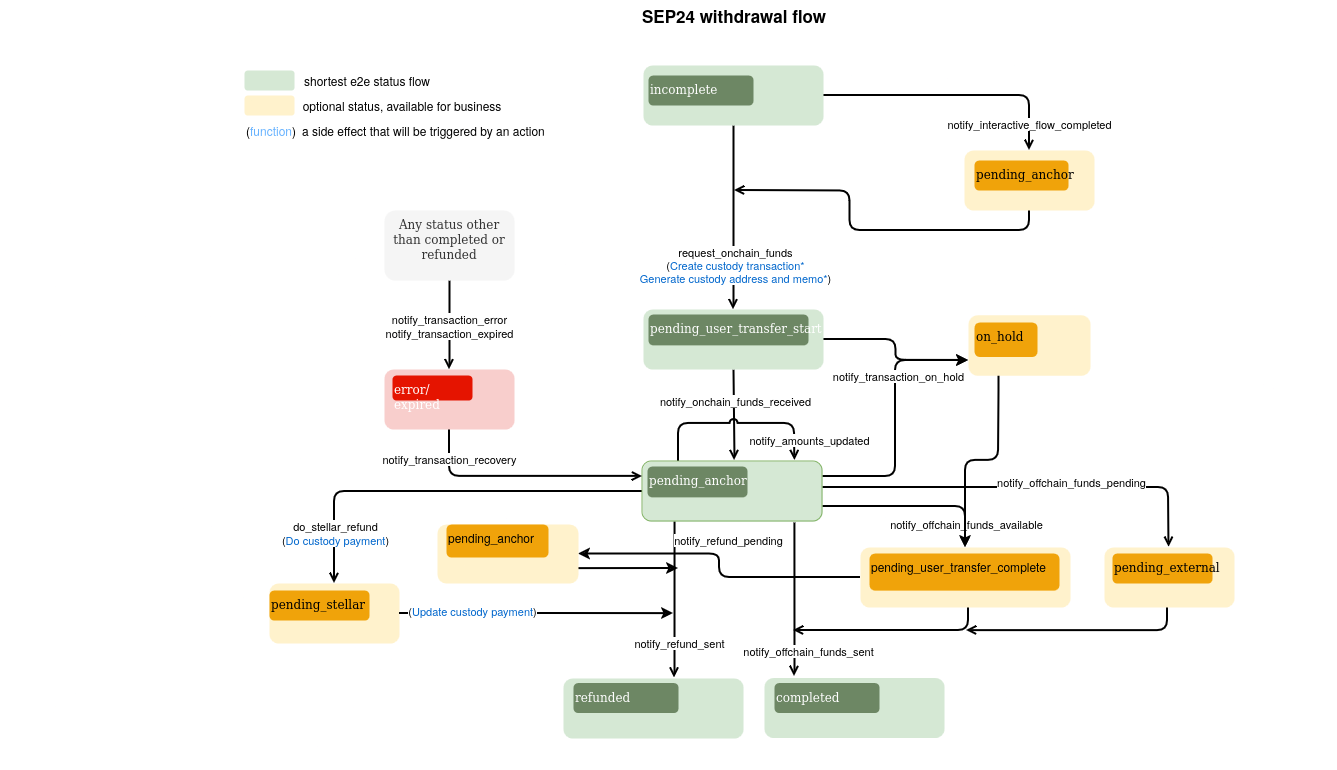
Ready to Receive Funds
Similar to deposit, the next step is to notify the user that the anchor is ready to receive funds. However, as your service will be receiving transactions over the Stellar network, the update will look differently.memoValue of memo to attach to the transactionmemo_typeType of memo that the anchor should attach to the transactiondestination_accountDestination account
The Stellar account that will be used to receive funds should be configured.
Processing KYC Information
This step is optional, and it’s similar to Processing KYC Information of the deposit flow.Funds Received
If onchain funds were received, you need to provide amounts and change the status of the transaction topending_anchor.
Amount Updated
If onchain funds were received, but for some reason theamount_in differs from specified in the interactive flow (amount_expected), you can update amount_out and fee_details to make them correspond to the actual amount_in. The status of the transaction in this case won’t be changed and will be equal to pending_anchor.
Only
amount_out and fee_details can be updated using this JSON-RPC request, and you don’t need to specify the assets of the amounts.Offchain Funds Sent
To complete the transaction and change its status tocompleted, you need to make the notify_offchain_funds_sent JSON-RPC request.
Offchain Funds Available
You can move transaction status topending_user_transfer_complete if offchain funds were sent, and if it’s ready for the user / recipient to pick it up.
Offchain Funds Pending
Another option is to move the transaction’s status topending_external. This status means that the payment has been submitted to an external network, but is not yet confirmed.
Refund Sent
The refund logic works in the same way as for the deposit flow. For more details, see Refund Sent of the deposit flow.Transaction Error
Works in the same manner as for the deposit flow. For more details, see Transaction Error of the deposit flow.Expired Transaction
Works in the same manner as for the deposit flow. For more details, see Expired Transaction of the deposit flow.On-Hold Transaction
Works in the same manner as for the deposit flow. For more details, see On-Hold Transaction of the deposit flow.Transaction Recovery
Works in the same manner as for the deposit flow. For more details, see Transaction Recovery of the deposit flow.Tracking Stellar Transactions
Using the Payment Observer allows you to delegate this step to the Anchor Platform. To enable the Payment Observer, use the--stellar-observer flag in the command section of the compose file.
The Payment Observer will track all transactions sent to the distribution account. When the transaction with the expected memo is detected in the network, the status will automatically change to pending_anchor and event will be the emitted (if Kafka is used).
In order to update the transaction’s statuses, the observer makes corresponding JSON-RPC requests to the platform. It should use the following URL.
If you already have a system that monitors payments, make sure that the logic of the system matches the description below:First, wait for the transaction to be included in the ledger (using an SDK). This transaction must have the expected memo and destination address (distribution account). Once this transaction has been detected and verified, notify the user that the funds have been received using the notify_onchain_funds_received JSON-RPC request.