

- Recovering assets that have been fraudulently obtained
- Responding to regulatory actions
- Enabling identity-proofed persons to recover an enabled asset in the event of loss of key custody or theft
Operations
Set Options
The issuer sets up their account to enable clawbacks using theAUTH_CLAWBACK_ENABLED flag. This causes every subsequent trustline established to any assets issued by that account to have the TRUSTLINE_CLAWBACK_ENABLED_FLAG set automatically.
If an issuing account wants to set the AUTH_CLAWBACK_ENABLED_FLAG, it must have the AUTH_REVOCABLE_FLAG set. This allows an asset issuer to claw back balances locked up in offers by first revoking authorization from a trustline, which pulls all offers that involve that trustline. The issuer can then perform the clawback.
Clawback
The issuing account uses this operation to claw back some or all of an asset. Once an account holds a particular asset for which clawbacks have been enabled, the issuing account can claw it back, burning it. You need to provide the asset, a quantity, and the account from which you’re clawing back the asset. For more details, refer the Clawback operation.Clawback Claimable Balance
This operation claws back a claimable balance, returning the asset to the issuer account, burning it. You must claw back the entire claimable balance, not just part of it. Once a claimable balance has been claimed, use the regular clawback operation to claw it back. Clawback claimable balances require the claimable balance ID. For more details, refer the Clawback Claimable Balance operation.Set Trust Line Flag
The issuing account uses this operation to remove clawback capabilities on a specific trustline by removing theTRUSTLINE_CLAWBACK_ENABLED_FLAG via the SetTrustLineFlags operation.
You can only clear a flag, not set it. So clearing a clawback flag on a trustline is irreversible. This is done so that you don’t retroactively change the rules on your asset holders. If you’d like to enable clawbacks again, holders must reissue their trustlines.
Examples
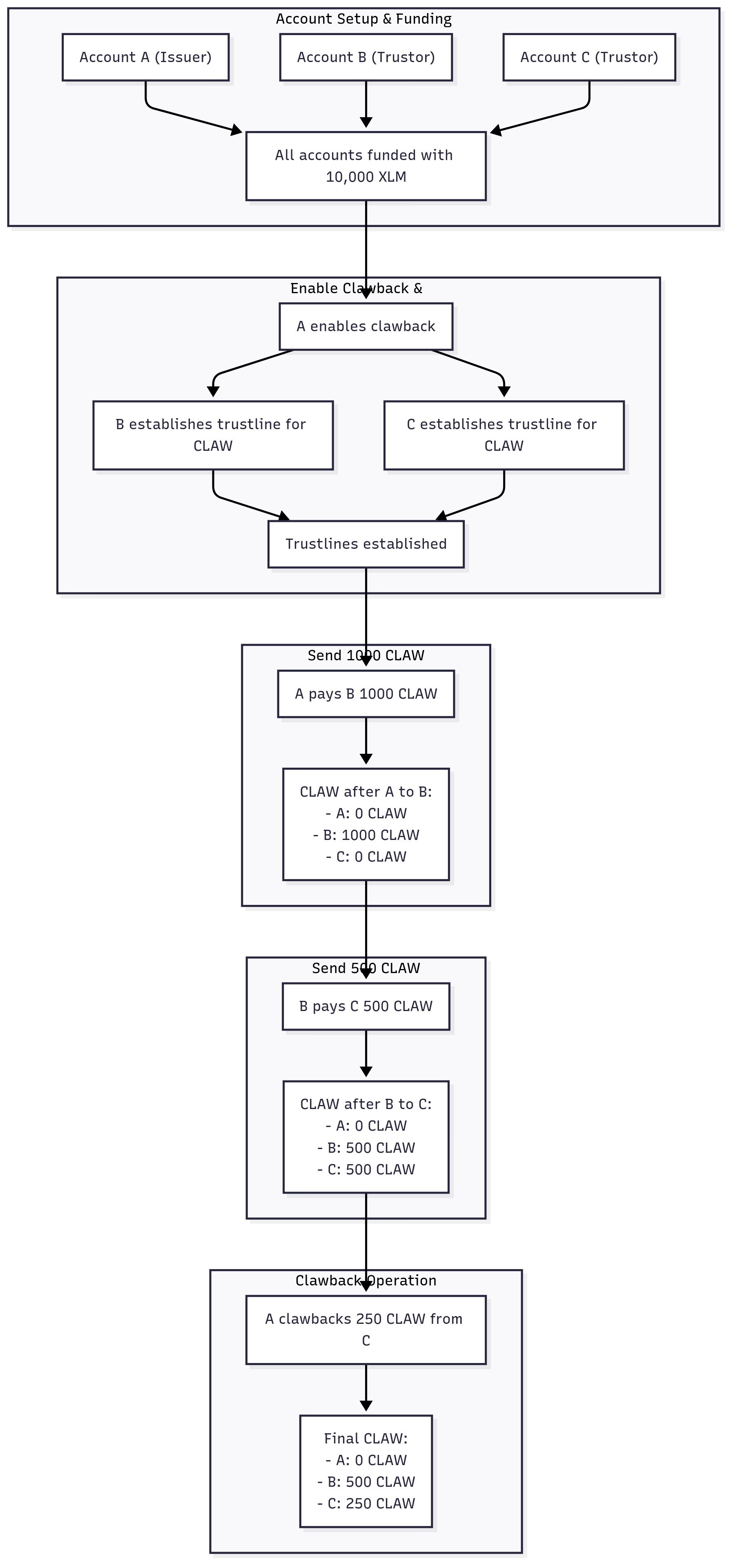
Here we’ll cover the following approaches to clawing back an asset. Example 1: Issuing account (Account A) creates a clawback-enabled asset and sends it to Account B. Account B sends that asset to Account C. Account A will then clawback the asset from C. Example 2: Account B creates a claimable balance for Account C, and Account A claws back the claimable balance. Example 3: Account A issues a clawback-enabled asset to Account B. A claws back some of the asset from B, then removes the clawback enabled flag from the trustline and can no longer clawback the asset.Preamble: Creating + Funding Accounts and Issuing a Clawback-able Asset
First, we’ll set up an account to enable clawbacks and issue an asset accordingly. Properly issuing an asset (with separate issuing and distribution accounts) is a little more involved, but we’ll use a simpler method here. Also, note that we first need to enable clawbacks and then establish trustlines since you cannot retroactively enable clawback on existing trustlines. The following code snippet contains helper functions that will be used in the following examples.Example 1: Payments
This example will highlight how the asset issuer holds control over their asset regardless of how it gets distributed to the world. In this scenario:- Account A will pay Account B with 1000 tokens of its custom asset.
- Account B will then pay Account C 500 tokens in turn.
- Finally, Account A will claw back half of Account C’s balance, burning 250 CLAW tokens.
runExample1(), you should see output similar to:
Clawback Flow Chart
Clawback Flow Chart
Example 2: Claimable Balances
Direct payments aren’t the only way to transfer assets between accounts: claimable balances also do this. Since they are a separate payment mechanism, they need a separate clawback mechanism. In this scenario:- Account A will pay Account B with 1000 tokens of its custom asset.
- Account B creates a Claimable Balance for Account C for 300 tokens. (You can query the Claimable Balance via RPC’s
getLedgerEntriesendpoint.) - Account A then claws back the Claimable Balance from Account C.
- The Claimable Balance entry is deleted and no longer queryable.
runExample2(), you should see output similar to:
Example 3: Selectively Enabling Clawback
When you enable theAUTH_CLAWBACK_ENABLED_FLAG on your account, it will make all future trustlines have clawback enabled for any of your issued assets. This may not always be desirable as you may want certain assets to behave as they did before. Though you could work around this by reissuing assets from a “dedicated clawback” account, you can also simply disable clawbacks for certain trustlines by clearing the TRUST_LINE_CLAWBACK_ENABLED_FLAG on a trustline.
In this scenario:
- Account A issues an asset and sends 1000 tokens to a distribution account (Account B).
- Account A claws back 500 tokens from Account B.
- Account A then clears the trustline so that it (the issuer) can no longer clawback the asset.
- Account A then attempts to clawback 250 tokens from Account B and fails.
runExample3(), you should see output similar to: